Chat Formats Config
Source file:
modules/chat/Chat Formats/config.yml
The Chat Formats module controls FioChat's main chat rendering pipeline. In the current build, it is enabled by the master toggle modules.formats in modules/settings.yml.
The active config path is the one above. FioChat can still migrate older module files from:
modules/formats/config.yml
modules/chat/formats/config.yml
Module Preview
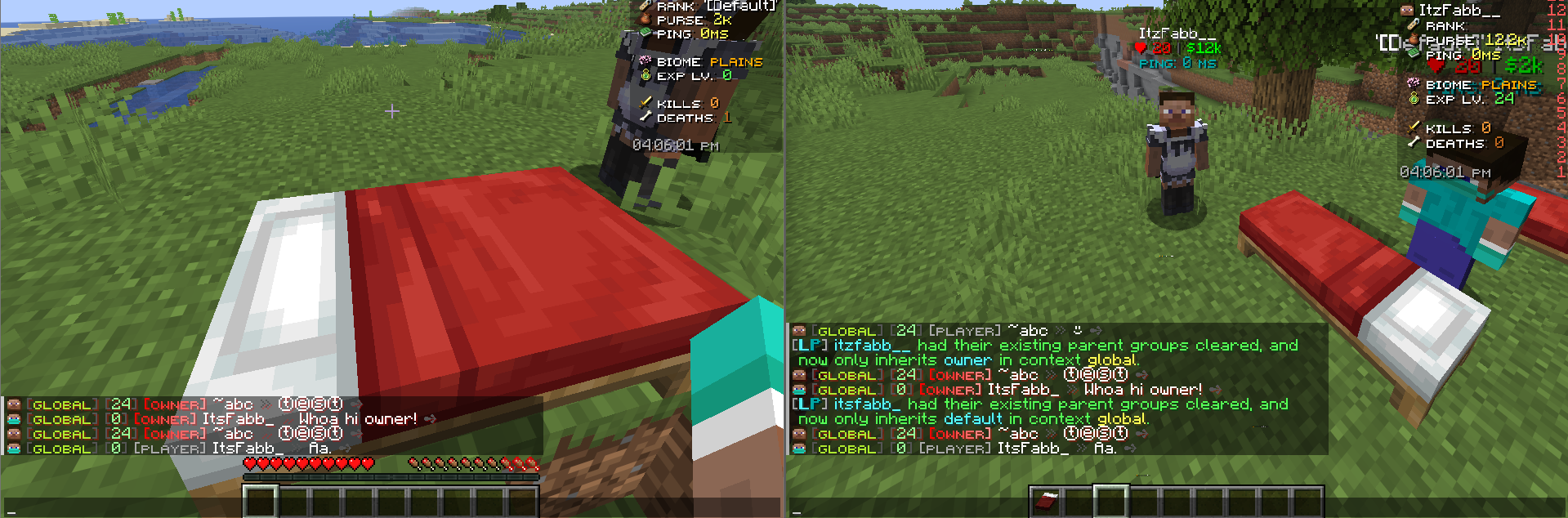
modules.formats
modules:
  formats: true
modules.formats is the master toggle for this module. The current default is true.
When this is false, FioChat does not apply the chat formatting templates and rank-based chat layout from this config.
settings.debug-log
settings:
  debug-log: false
settings.debug-log controls module debug logging. The current value is false.
When enabled, FioChat can write extra diagnostics while loading formats, resolving placeholders, matching ranks, and applying chat actions. It does not change the visible format logic.
number-format.suffixes
number-format:
  suffixes:
    - ""
    - "K"
    - "M"
    - "B"
    - "T"
    - "Q"
number-format.suffixes controls how FioChat shortens values used by *_fc_formatted placeholders.
The current suffix list maps values into compact labels such as K, M, B, T, and Q. Index 0 is empty so numbers below 1,000 stay unchanged.
settings.sprite-object.enabled
settings:
  sprite-object:
    enabled: true
This toggle controls sprite, head, and texture object rendering in chat. The current default is true.
When disabled, sprite-style objects and player-head style objects stay as plain text instead of being rendered as chat icons.
settings.sprite-object.player.face
settings:
  sprite-object:
    player:
      face: true
face controls the profile face shown on the left side of chat formats. The current default is true.
settings.sprite-object.player.head
settings:
  sprite-object:
    player:
      head: true
head controls [p:%player_name%] style placeholders. The current default is true.
settings.sprite-object.player.texture.enabled
settings:
  sprite-object:
    player:
      texture:
        enabled: true
texture.enabled controls [t:<texture>] rendering. The current default is true.
settings.sprite-object.need-extra-space
settings:
  sprite-object:
    need-extra-space: true
This adds a small spacing buffer so text does not stick too tightly to sprite or object icons. The current default is true.
settings.sprite-object.hide-invisible-head
settings:
  sprite-object:
    hide-invisible-head: false
This controls whether invisible player heads are hidden. The current default is false.
settings.sprite-object.atlas
settings:
  sprite-object:
    atlas:
      item: "minecraft:items"
      block: "minecraft:blocks"
atlas.item and atlas.block define the default atlas sources used by the sprite system.
settings.sprite-object.item-textures-use-block-atlas
settings:
  sprite-object:
    item-textures-use-block-atlas: true
This keeps item textures rendered from the block atlas when needed. The current default is true.
settings.sprite-object.strict-player-names
settings:
  sprite-object:
    strict-player-names: true
This makes player-name parsing stricter so name tokens are less ambiguous. The current default is true.
settings.inline-object-blacklist
settings:
  inline-object-blacklist:
    sprite:
      - "stone"
      - "[s:blaze_powder]"
    player:
      - "[p:Notch]"
      - "Microsoft"
This blacklist keeps listed sprite or player tokens as plain text instead of rendering them as inline objects.
Sprite and player entries are matched case-insensitively.
settings.markup
settings:
  markup:
    bold: true
    italic: true
    underlined: true
    strikethrough: true
    spoiler: true
These toggles control markdown-like chat markup support. The current defaults keep all of them enabled.
settings.chat-sound
settings:
  chat-sound:
    enabled: true
    sound: "BLOCK_BUBBLE_COLUMN_BUBBLE_POP"
    volume: 2.9
    pitch: 1.25
This plays a chat feedback sound when formatted chat events are processed.
fallback.structure
fallback:
  structure: "%group% %player% %message%"
fallback.structure defines the base layout used when no role-specific format matches. The current default keeps group, player, and message in a compact order.
fallback.shadow_settings
fallback:
  shadow_settings:
    enabled: true
    color: "#FFFFFF"
    opacity: "1.0"
This applies a global shadow wrapper to the fallback format.
If enabled, FioChat wraps the final fallback structure in a shadow using the configured color and opacity.
fallback.player
fallback:
  player:
    format: "<white>%player_name%</white>"
fallback.player.format controls how the player name segment is rendered in the fallback layout.
The current config also allows hover content on this segment.
fallback.group
fallback:
  group:
    format: "%luckperms_prefix%"
fallback.group.format controls the rank or prefix segment used by the fallback layout.
This segment also supports hover content and conditional actions under msgaction.
fallback.message
fallback:
  message:
    format: "<dark_gray>></dark_gray> <white>%message%</white>"
fallback.message.format controls the actual chat message body in the fallback layout.
This segment can also carry hover text and click actions, which makes it useful for moderation or report flows.
format.default
format.default is the main role format used by players whose Vault group does not have a dedicated section.
The current default structure is:
format:
  default:
    shadow_settings:
      enabled: true
      color: "#000000"
      opacity: "0.1"
    structure: "%xp_lvl% %rank% %player%%discord% %message%"
This layout combines the XP segment, rank badge, player segment, Discord status segment, and message segment.
format.owner
format.owner is the dedicated owner role style.
The source config gives it a stronger shadow color and a more prominent rank badge than the default role.
format.admin
format.admin is the dedicated admin role style.
It keeps the same general structure as default, but uses its own rank badge styling.
format.mod
format.mod is the dedicated moderator role style.
This role uses a more compact structure:
structure: "%rank% %player% %message%"
format.<role>.structure
structure controls the component order for each role.
The current config supports component placeholders such as:
%xp_lvl%
%player%
%rank%
%discord%
%message%
%msg%
Any component that is missing or hidden is removed automatically, and extra spacing is compacted.
format.<role>.player
player.format controls the player segment for a role.
This segment can also include hover text and click actions.
format.<role>.rank
rank.format controls the rank badge or prefix rendering for a role.
This segment is the main place to style group labels such as default, mod, admin, or owner.
format.<role>.discord
The discord component shows a conditional Discord link indicator.
The current config uses two branches:
discord:
if_return_as_yes:
check: "%discordsrv_user_islinked%==yes"
format: "<green>â—</green> "
if_return_as_no:
check: "%discordsrv_user_islinked%==no"
format: "<gray>â—‹</gray> "
This is rendered inline when the linked or unlinked condition matches.
format.<role>.xp_lvl
The xp_lvl component shows compacted player XP levels.
It uses *_fc_formatted placeholders, so large values are shortened automatically.
format.<role>.message
message.format controls the final chat message text for the role.
This segment can also include hover and click actions. In the current config, the message segment is used for report shortcuts.
Hover And Actions
Hover and click actions are supported in any component section.
The current config uses these action types:
run_command
suggest_command
copy_to_clipboard
open_url
These are especially useful on player, rank, and message segments.
Placeholder Support
Common placeholders used by this module include:
%player_name%
%name%
%displayname%
%rank_id%
%rank_name%
%vault_group%
%lp_rank_id%
%world%
%world_prefix%
%world_tag%
%channel%
%message%
The structure placeholders are:
%xp_lvl%
%player%
%rank%
%msg%
%msg% is the message alias used by the structure layer, while %message% is the actual message body placeholder used inside component formats.
Legacy Path Note
The active config path for this build is:
modules/chat/Chat Formats/config.yml
The plugin can still migrate older config paths from:
modules/formats/config.yml
modules/chat/formats/config.yml
This page follows the current module path and the current chat-format layout used by the build.
This page is source-backed and includes a short callout so the content reads like a guide instead of plain reference text.