Chat Channels
Related files:
modules/chat/Chat Channels/config.yml
modules/chat/Chat Channels/gui/channels.yml
Source file:
modules/chat/Chat Channels/config.yml
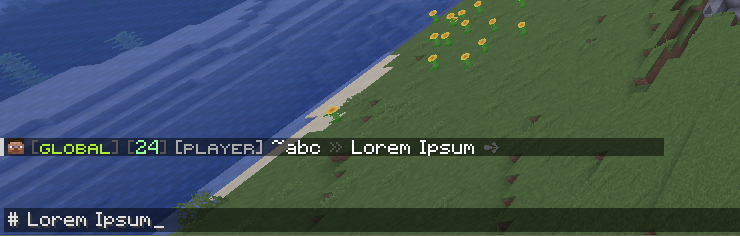
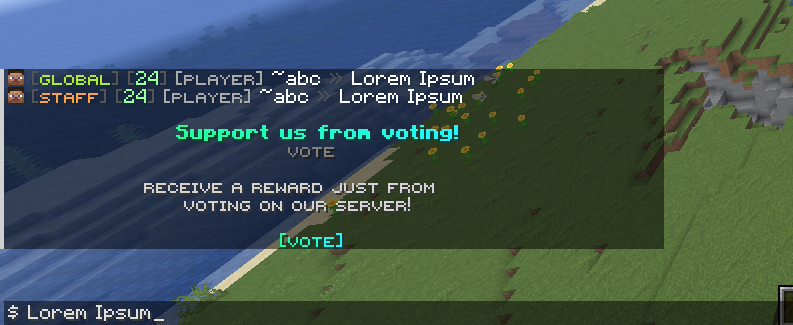
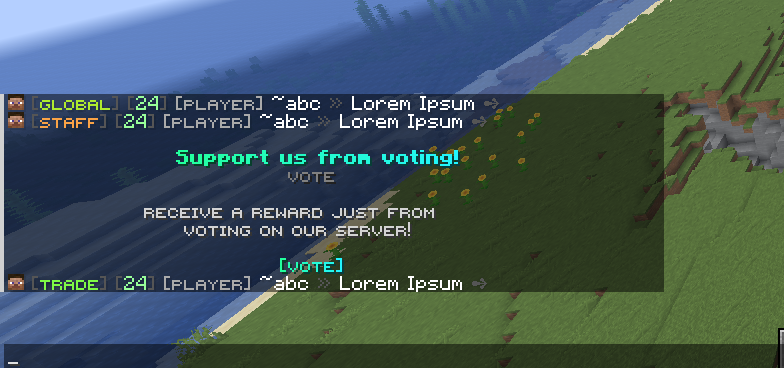
Chat Channels splits public chat into named channel groups. Players can permanently join a channel with /fiochat channel join <id>, return to the default channel with /fiochat channel leave, open the selector with /channel, or temporarily route one message into a prefixed channel such as $ selling diamonds or # staff note.
The module is controlled by modules.chat-channels in modules/settings.yml. The current default is true.
Module Preview
settings.debug-log
settings.debug-log controls debug logging for this module. The current value is false.
When debug logging is active, the service can log reload details, channel joins, prefix routing, recipient filtering, mute-chat blocking, manual delivery decisions, and GUI reload details. This setting does not change the channel rules themselves; it only makes the module more talkative in diagnostics.
settings.default-channel
settings.default-channel is the fallback channel id. The current value is global.
The service normalizes this id to lowercase. If the configured default channel does not exist after channels are loaded, FioChat uses the first loaded channel instead. The default channel is used for new player channel state, missing stored preferences, invalid stored preferences, and /fiochat channel leave.
settings.auto-join-default-on-join
settings.auto-join-default-on-join controls whether the service initializes a player's channel state when they join. The current value is true.
When true, handlePlayerJoin calls the current-channel resolver. If the player does not already have a valid stored channel, the resolver assigns the default channel and starts channel duration tracking. If a stored channel exists and the player still has permission for it, that stored selection remains active.
settings.reset-on-quit
settings.reset-on-quit controls whether a player's channel selection is reset when they leave the server. The current value is false.
When false, the selected channel can persist through the preference store. When true, quitting writes the player back to the default channel and clears channel-duration tracking for that player.
settings.prefix-routing.enabled
settings.prefix-routing.enabled enables one-message prefix routing. The current value is true.
When enabled, FioChat scans chat messages for configured channels.<id>.chat-prefix values. Prefix-routed messages are temporary: they route that one message into the prefixed channel but do not permanently change the player's selected channel.
settings.prefix-routing.require-space-after-prefix
settings.prefix-routing.require-space-after-prefix controls how strict prefix routing is. The current value is true.
When true, $ hello can route to a $ prefix channel, but $hello does not. If the message is only the prefix, such as $, the service cancels the chat event and sends the configured empty-prefix message. When false, both $ hello and $hello are accepted, and one leading space after the prefix is removed from the routed message.
settings.prefix-routing.update-current-channel
settings.prefix-routing.update-current-channel remains in the YAML with the current value false, but the current service intentionally ignores it.
The code forces prefixRoutingUpdatesChannel to false during reload. Prefix routing is now always temporary by design. Permanent switching is done through /fiochat channel join <channel> or the channel selector GUI.
settings.permissions.use
settings.permissions.use is the base permission for channel chat features. The current value is fiochat.channel.use.
The service checks this permission before opening the channel GUI, processing /fiochat channel, and routing a player's channel chat. If the player lacks this permission during chat routing, the module does not apply channel routing for that sender.
settings.permissions.list
settings.permissions.list controls /fiochat channel list. The current value is fiochat.channel.list.
A sender must have both the base use permission and this list permission to list channels. The list output only includes channels whose per-channel permission the sender has.
settings.permissions.join
settings.permissions.join controls channel joining, leaving, and prefix routing. The current value is fiochat.channel.join.
A player must have this permission to use /fiochat channel join, /fiochat channel leave, and prefix routing into a channel. Prefix routing also requires the player to have the target channel's per-channel permission.
settings.permissions.channel-base
settings.permissions.channel-base is the default base for per-channel permissions. The current value is fiochat.channel.
For any non-global channel without an explicit permission, the service builds <channel-base>.<channel-id>. For example, trade becomes fiochat.channel.trade, and staff becomes fiochat.channel.staff. The global channel receives an empty per-channel permission by default unless you explicitly configure one.
messages
The current messages section only contains comments. Channel feedback can still be overridden here, but many mute-chat feedback lines moved to modules/announce/Mute Chat/config.yml.
Supported channel-specific override paths include messages.feature-disabled, messages.no-permission, messages.players-only, messages.usage, messages.unknown-channel, messages.join-no-permission, messages.speak-no-permission, messages.joined-channel, messages.already-in-channel, messages.left-channel, messages.current-channel, messages.channel-list-header, messages.channel-list-entry-current, messages.channel-list-entry, messages.channel-list-empty, and messages.prefix-message-empty.
channels
channels is the map of channel definitions. The current defaults define global, trade, and staff.
Channel ids are normalized to lowercase. Each channel id is added to the lookup table, and each alias is also added if no earlier channel already claimed it. Prefix bindings are sorted by longest prefix first, so longer prefixes win before shorter overlapping prefixes.
channels.<id>.display
display is the visible channel name. It is translated by FioChat color formatting when used in chat tags, hover text, list messages, and GUI placeholders.
Current values are <#afeb2f><smallfont:Global>, <#7ffa46><smallfont:Trade>, and <#faa346><smallfont:Staff>.
channels.<id>.format
format controls the channel tag added to chat. The current default for all three channels is:
format: "<dark_gray>[</dark_gray>%channel_display%<dark_gray>]</dark_gray>"
The service replaces %channel%, %channel_id%, and %channel_display%, translates the result, and prepends it to the chat format when normal event recipient filtering works. If hover tags, inline objects, mention highlighting, reply components, rank components, profile icons, shadow tags, or recipient application issues require manual delivery, the same tag is built into the component message manually.
channels.<id>.aliases
aliases are alternate names accepted by channel commands and lookups. The current defaults are:
global: g, public
trade: t, market
staff: s, mod
Aliases are normalized to lowercase. They do not replace the primary id; they only resolve to it.
channels.<id>.chat-prefix
chat-prefix enables temporary one-message routing. Current values are empty for global, $ for trade, and # for staff.
An empty prefix does not create a prefix binding. A non-empty prefix routes a message into that channel when prefix routing is enabled and the sender has both the join permission and the target channel permission.
channels.<id>.hover
hover defines hover text for the channel tag in chat. Current hover text describes Global Chat, Trade Chat, and Staff Chat.
The service replaces %channel%, %channel_id%, and %channel_display% inside hover lines, translates formatting, and joins multiple lines with newline characters. Hover text is one reason FioChat may switch from normal Bukkit format mutation to manual component delivery.
channels.<id>.permission
permission is optional. It is commented in the current trade and staff defaults.
When present, it overrides the generated permission from settings.permissions.channel-base. When absent, non-global channels use <channel-base>.<channel-id>, and global uses no per-channel permission by default.
Current Channels
global is the default public channel. It has no chat-prefix, aliases g and public, and is designed for normal public chat.
trade is a market channel. It uses $ as the temporary prefix, aliases t and market, and defaults to generated permission fiochat.channel.trade.
staff is a private team channel. It uses # as the temporary prefix, aliases s and mod, and defaults to generated permission fiochat.channel.staff.
Recipient Filtering
Channel routing filters recipients before chat is delivered. A viewer must be online, must not be ignoring the sender, must not be blocked by anti-bot message viewing, must be allowed by chat audience scope, and must have permission for the target channel.
For normal selected-channel chat, the viewer must also be listening to the same channel. For prefix-routed chat, the listener-channel check is skipped, so eligible viewers with permission for that target channel can receive the temporary routed message even if their selected channel is different.
Mute Chat Integration
The Chat Channels service also integrates with the Mute Chat module. If global chat is muted and the sender lacks the configured mute bypass permission, chat is cancelled. If an individual channel is muted, only that channel blocks non-bypassing senders.
Mute-chat command blocking is also handled here when the mute-chat config enables command blocking. Teleport utility commands such as /spawn, /warp, /home, /tpa, /tp, /rtp, and /wild are exempted by the code.
Player Preference Storage
Permanent channel selections are stored per player. In file mode, the path is modules/channels/player-channels.yml. In database mode, the namespace is channels.preferences.
Stored preferences are loaded on reload so players can keep their selected channel across restarts. Invalid stored channel ids are removed from memory after channels load.
menus.enabled
menus.enabled controls the /channel selector GUI. The current value is true.
If false, trying to open the menu sends Channel GUI is disabled. The command path still requires the Chat Channels service and base use permission before it reaches the menu.
menus.rows
menus.rows controls inventory height. The current value is 6, which creates a 54-slot inventory.
The loader clamps rows to a valid inventory row count. Slot values throughout the GUI are interpreted against this inventory size.
menus.title
menus.title is the inventory title. The current value is <dark_gray>Chat Channels</dark_gray>.
FioChat translates the color formatting before creating the inventory.
menus.content-slots
content-slots is the fallback slot pool for channel entries. The current values are 10-16, 19-25, and 28-34.
If a channel does not have a dedicated configured slot, the GUI places it in the first unused content slot. If content slots run out, it searches the inventory for the first unused slot.
menus.decorations
decorations adds non-clickable frame items. The current GUI uses BLACK_GLASS on slots 45-53 and GRAY_GLASS on slots 0-8.
Decorations only fill empty slots. If a channel item or static button already occupies a slot, decoration placement does not overwrite it. hide_tooltip: true is applied when supported by the server API.
menus.items.entry.selected-format
selected-format is the text used for %isselected% when the channel is the player's current channel. The current value is <green>Selected</green>.
The same value is also available as %selected% in GUI item placeholders.
menus.items.entry.unselected-format
unselected-format is the text used for %isselected% when the channel is not currently selected. The current value is <red>Not Selected</red>.
menus.items.entry.prefix-none
prefix-none is the GUI display value for channels without a chat prefix. The current value is <gray>None</gray>.
This is why the Global channel can show a friendly value instead of a blank prefix.
menus.items.entry.material
material is the default item material for channel entries. The current value is PAPER.
Per-channel items can override it with their own material.
menus.items.entry.name
name is the default display name for generated channel entries. The current value is <yellow>%channel_display%</yellow>.
Available placeholders are %channel%, %channel_id%, %channel_display%, %chat_prefix%, %chat-prefix%, %isselected%, and %selected%.
menus.items.entry.lore
lore is the default lore for generated channel entries. The current template displays channel id, chat prefix, selection status, and a click prompt.
Per-channel items can replace the base lore and then append selected-lore or unselected-lore depending on current state.
menus.items.channels.<id>.slot
slot pins a channel to a specific inventory slot. The current defaults use slot 20 for global, 22 for trade, and 24 for staff.
If the pinned slot is invalid or already used, the GUI falls back to the content slot pool.
menus.items.channels.<id>.material
material overrides the default entry material. Current values are GLOBE_BANNER_PATTERN, EMERALD, and BLAZE_ROD.
If a material name is invalid, the item builder falls back to a safe default.
menus.items.channels.<id>.name
name overrides the default entry name for that channel. The current names color the channel display with its channel color.
Placeholders are the same as the entry template placeholders.
menus.items.channels.<id>.lore
lore overrides the default entry lore for that channel. Current lore describes the channel purpose, shows chat prefix, shows selected status, and gives a click prompt.
menus.items.channels.<id>.selected-lore
selected-lore is appended when the channel is currently selected. The current value is <green>You are currently here.</green> for all three configured channels.
menus.items.channels.<id>.unselected-lore
unselected-lore is appended when the channel is not selected. The current value is <gray>Switch to this channel.</gray>.
menus.items.channels.<id>.actions.any
actions.any defines click actions for a channel item. The current channel items use:
- "[CHATCHANNELS] <id>"
- "[SOUND] UI_BUTTON_CLICK 1 1"
[CHATCHANNELS] <id> joins that channel through the same joinChannel service method used by commands. After joining, the menu refreshes. If a channel entry has no actions at all, the GUI still treats clicking it as a channel join.
menus.items.buttons.close
The close button is a static GUI button at slot 49 using material BARRIER.
Its actions are [CLOSE] and [SOUND] BLOCK_SHULKER_BOX_CLOSE 1 2 master. [CLOSE] closes the inventory. The sound action supports sound name, volume, pitch, and optional sound category.
Supported GUI Item Fields
Channel menu items and decoration items support common item fields such as material, name, lore, hide_tooltip, custom-model-data, glow, item flags, and texture handling where supported by the shared item builder.
Only the fields present in the current defaults are required for this module to work.
Commands
/channel opens the selector GUI. /channel list lists available channels. /fiochat channel list, /fiochat channel current, /fiochat channel join <channel>, and /fiochat channel leave use the same service.
The plugin also declares /channel with alias /channels, and the root /fiochat channel command routes to the same handler.
This page is source-backed and includes a short callout so the content reads like a guide instead of plain reference text.