ItemTag Config
Source file:
modules/display/Item Drop Tag/config.yml
Important
ItemTag uses runtime display entities. Tune update interval and visibility scope first to avoid performance spikes on high-drop servers.
Module Preview
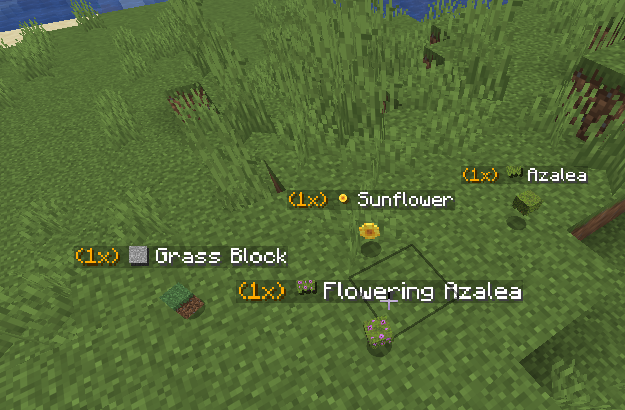
Core Stack Behavior
Stack Limits and Display Policy
settings:
  stack-limit: -1
  only-show-single-item: true
- Purpose: Controls how item stack labels are shown.
- Options:
stack-limit: -1usually means no hard stack cap override.only-show-single-item: truelimits visual clutter from bulk drops.
World and Region Scope
settings:
  world-whitelist: []
  world-blacklist: []
  region-whitelist: []
  region-blacklist: []
- Purpose: Restricts where ItemTag is active.
- Options:
- Use blacklist for heavy farm/minigame worlds.
- Use whitelist for controlled showcase worlds.
Stack Particle Layer
Particle Toggle and Type
settings:
  stack-particle:
    enabled: true
    type: "DUST"
    count: 5
    size: 0.95
    speed: 0.01
- Purpose: Adds visual signal around stacked drops.
- Options:
- Lower
countandspeedfor performance-friendly behavior. - Keep
DUSTfor customizable color gradients.
- Lower
Particle Colors
settings:
  stack-particle:
    color:
      primary: "#FF0000"
      secondary: "#FF9999"
- Purpose: Defines stack particle color palette.
- Options:
- Use colors that remain readable in your active biome lighting.
Auto-Stack Engine
Auto Merge Settings
settings:
  auto-stack:
    enabled: true
    radius: 1.5
    interval-ticks: 10
- Purpose: Merges nearby item entities automatically.
- Options:
- Larger radius increases merge aggressiveness.
- Higher interval reduces CPU usage.
Tag Format Output
Display Lines
settings:
  format:
    - "<gold>(%amount%x)</gold> <white>[s:%material_id%] %materialName%</white>"
    - ""
- Purpose: Controls text shown above dropped items.
- Options:
- Keep first line concise and info-rich.
- Use optional empty lines sparingly.
Sprite Rendering
Sprite Path Resolution
settings:
  sprite:
    force-item-path: false
- Purpose: Controls how texture paths are resolved.
- Options:
- Enable force-item-path only if block/item atlas mapping conflicts.
Sprite Overrides
settings:
  sprite:
    overrides:
      grass_block: "block/grass_block_top"
      stone: "block/stone"
      bamboo: "item/bamboo"
- Purpose: Remaps specific materials to cleaner texture icons.
- Options:
- Use overrides for awkward default render cases.
Sprite Blacklist
settings:
  sprite:
    blacklist:
      - "rose_bush"
      - "leaf_litter"
      - "moss_carpet"
- Purpose: Excludes problematic or noisy materials from sprite rendering.
- Options:
- Expand list for decorative blocks that render poorly as tags.
Text Display Entity Tuning
Text Display Runtime
settings:
  text-display:
    billboard: "CENTER"
    shadowed: true
    see-through: true
    default-background: false
    line-width: 200
    view-range: 32.0
    text-opacity: 255
- Purpose: Controls visual behavior of Minecraft
TEXT_DISPLAYentity. - Options:
view-range: lower for performance, higher for visibility.text-opacity: reduce for softer overlays.
Background Layer
settings:
  text-display:
    background:
      enabled: false
      color: "#66000000"
- Purpose: Optional backing panel for contrast.
- Options:
- Enable only if text readability is poor in bright areas.
Update Cycle and Performance
Refresh Interval
settings:
  update-interval-ticks: 5
- Purpose: Controls how often ItemTag text/entities are refreshed.
- Options:
- Lower interval = more responsive updates, higher cost.
- Higher interval = lighter performance, slower visual sync.
Performance Baseline
For busy survival servers, start with:
auto-stack.interval-ticks: 10-20update-interval-ticks: 8-12- reduced particle count
Owner Validation
- Test dropped-item hotspots (farms/mob grinders) for TPS impact.
- Verify auto-stack merges correctly across common drop types.
- Verify sprite overrides and blacklist entries resolve as expected.
- Verify text readability in day/night and dark biomes.
- Verify world/region filters are respected.