Player Motd (Module)
Configuration guide for modules/announce/Message of the Day/motd.yml.
Important
Decide delivery timing first (especially antibot verification gating), then tune presentation channels (message/title/actionbar/bossbar).
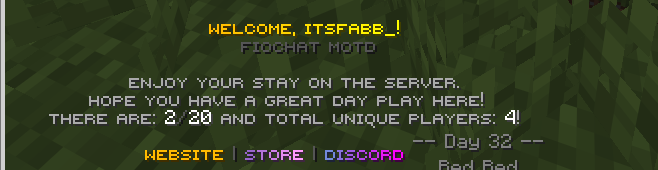
Module Preview
Configuration Files
modules/announce/Message of the Day/motd.yml
Delivery Timing and Placeholder Rules
Antibot Verification Gate
settings:
  antibot:
    wait-until-verified: true
- Purpose: Delays MOTD delivery until antibot verification completes.
- Options:
true: prevents MOTD from firing for unverified joins.false: sends MOTD immediately on join.
PlaceholderAPI Processing
settings:
  placeholderapi:
    message: true
- Purpose: Enables placeholder parsing in MOTD message lines.
- Options:
- Keep enabled if using
%player_name%,%server_online%, etc.
- Keep enabled if using
Main Message Block
MOTD Message Lines
message:
  enabled: true
  lines:
    - "<align:center><gradient:#FFBB00:#FFFF00><smallfont:welcome, %player_name%!></gradient>"
    - "<align:center><dark_gray><smallfont:fiochat motd></dark_gray>"
- Purpose: Core join message content shown to player.
- Options:
- Use centered lines for branded welcome style.
- Keep line count moderate for readability.
Dynamic Server Context
message:
  lines:
    - "<align:center><gray><smallfont:there are:</gray> <white>%server_online%</white><dark_gray>/</dark_gray>%server_max_players%"
- Purpose: Displays live server activity and context.
- Options:
- Include
%server_unique_joins%for community milestone feeling.
- Include
Link Tokens
message:
  lines:
    - "<align:center><smallfont:{link} | {store} | {discord}>"
- Purpose: Promotes quick navigation/actions from MOTD.
- Options:
- Keep token names consistent with your placeholder configuration.
Title Presentation
Title and Subtitle
title:
  enabled: true
  title: "<gradient:#9D0000:#F36B6B><bold>WELCOME</bold></gradient>"
  subtitle: "<#7a7a7a><smallfont:enjoy your stay.></smallfont>"
- Purpose: High-visibility welcome splash.
- Options:
- Use concise title text to avoid clipping on smaller displays.
Title Timing
title:
  fade-in: 5
  stay: 100
  fade-out: 10
- Purpose: Controls entry/hold/exit animation timing.
- Options:
- Lower
stayfor fast-paced servers. - Increase
stayfor roleplay/community servers.
- Lower
Actionbar Presentation
Actionbar MOTD
actionbar:
  enabled: false
  text: "<green><smallfont:motd delivered.></smallfont>"
- Purpose: Lightweight confirmation channel.
- Options:
- Enable when title is disabled for minimal HUD flow.
Bossbar Presentation
Bossbar MOTD
bossbar:
  enabled: false
  title: "<gold><smallfont:welcome to the server></gold>"
  color: "YELLOW"
  style: "SOLID"
  progress: 1.0
  seconds: 5
- Purpose: Optional persistent welcome banner for short duration.
- Options:
- Keep duration short to avoid UI crowding.
- Use solid style for clean visibility.
Recommended Profiles
Lightweight Profile
message:
  enabled: true
title:
  enabled: false
actionbar:
  enabled: true
bossbar:
  enabled: false
- Result: simple, low-noise MOTD flow.
Full Welcome Profile
message:
  enabled: true
title:
  enabled: true
actionbar:
  enabled: false
bossbar:
  enabled: true
- Result: cinematic join experience with strong branding.
Owner Validation
- Test first join with antibot enabled and disabled paths.
- Validate placeholder rendering in all MOTD lines.
- Validate title timing and readability in all themes.
- Validate bossbar does not conflict with other active bossbars.
- Validate link/store/discord token replacements work correctly.