Inventory Full Alert
This page documents the current modules/alerts/Inventory Full/ module from the newer FioChat source.
The module monitors player storage inventory slots and sends warnings when the inventory is almost full or completely full. The current system has separate per-player toggles for prewarn and full.
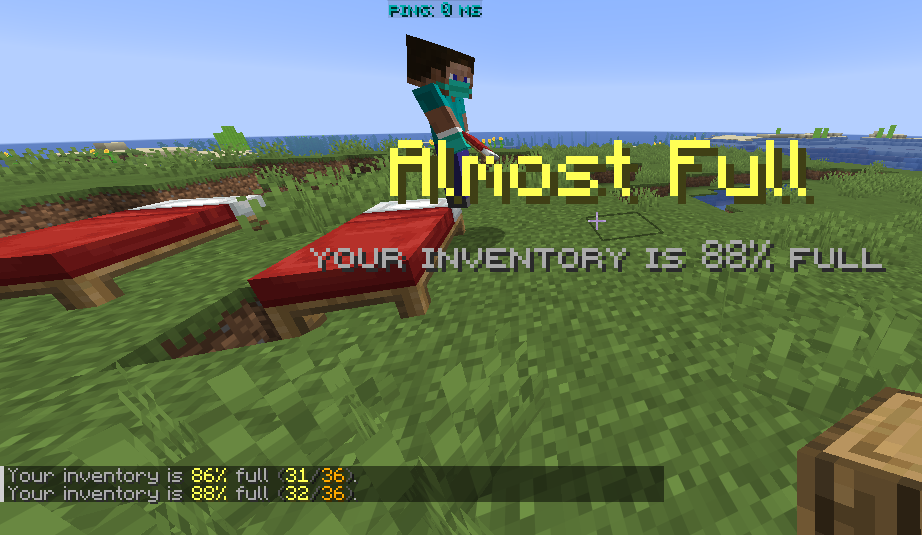
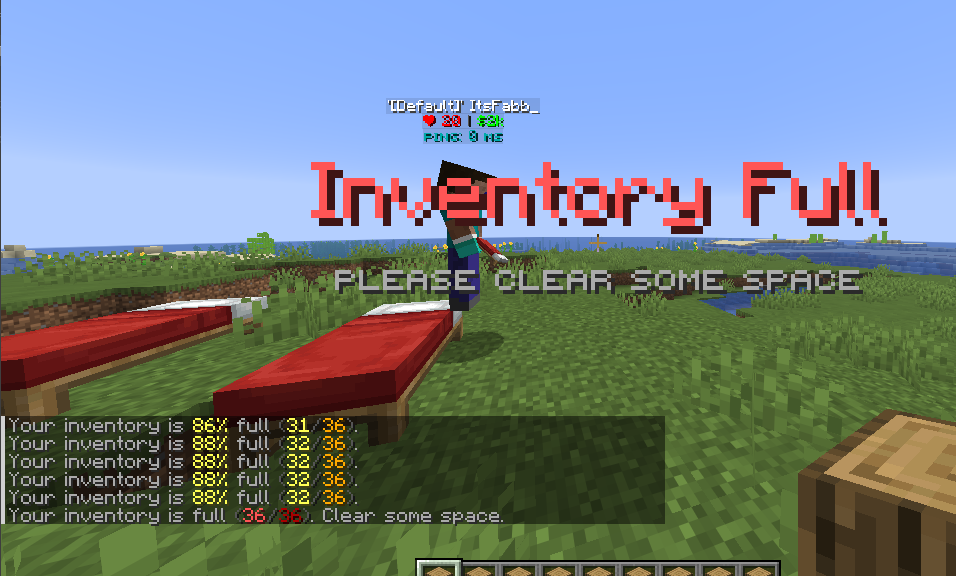
Module Preview
Configuration Files
modules/alerts/Inventory Full/config.ymlmodules/alerts/Inventory Full/toggles.yml
config.yml is the module configuration. toggles.yml is created and updated automatically by the plugin to store player choices, including the prewarn toggle, the full toggle, and per-player prewarn threshold overrides.
The service also performs best-effort migration from legacy paths:
modules/inventory-full-alert/config.ymlmodules/inventory-full-alert/toggles.yml
Permission
| Permission | Default | Detail |
|---|---|---|
fiochat.inventoryfullalert.use | true | Allows a player to receive inventory alerts. If the player does not have this permission, the service treats the player's alerts as disabled even when defaults are enabled. |
fiochat.inventoryfullalert.toggle | true | Allows a player to use inventory alert toggle commands. This still requires fiochat.inventoryfullalert.use. |
Tab completion also recognizes the legacy fiochat.inventoryalert.use permission, but the main service uses fiochat.inventoryfullalert.use.
Commands
/toggle inventoryalert <full|prewarn> [on|off|toggle|status]
/toggle inventoryalert threshold [<1-99>|reset|status]
/fiochat inventoryalert toggle <full|prewarn> [on|off|toggle|status]
/fiochat inventoryalert toggle threshold [<1-99>|reset|status]
Recognized module target aliases:
inventoryalertinventory-full-alertinventoryfullalertinvfullalertinvalert
Recognized alert targets:
prewarn,warn,nearfullfull,inventoryfullthreshold,prewarn-threshold,warn-threshold
Inventory Calculation
The module uses PlayerInventory#getStorageContents().
This means it counts the player's storage inventory, which is the main inventory plus the hotbar. Armor slots and the off-hand slot are not counted.
A slot is treated as used only when:
- the item stack is not
null; - the material is valid;
- the material is an item;
- the stack amount is greater than 0.
The percentage is calculated as:
floor((usedSlots * 100) / totalSlots)
If the player has 36 storage slots and 29 are occupied, the percentage is floor(29 * 100 / 36) = 80. With threshold-percent: 80, prewarn triggers at that point.
settings
Current default:
settings:
  debug-log: false
  default-enabled: true
  default-enabled-prewarn: true
  default-enabled-full: true
  check-interval-ticks: 20
  world-blacklist: []
settings.debug-log
Enables module debug logging.
The current default is false. On reload, the service can write a debug summary under the inventory-full-alert debug flag, including enabled state, check interval, world blacklist size, prewarn threshold, prewarn reminder, and full reminder.
This setting does not control player alerts. It exists for server owners who need to confirm whether the module is reading config and running its monitor task.
settings.default-enabled
The legacy/master default toggle for players without saved data in toggles.yml.
The current default is true. This value is used as the fallback for old toggle data and as the fallback for default-enabled-prewarn or default-enabled-full if those split-default keys are missing.
In the current source, prewarn and full are checked separately. The final player state is not just default-enabled; it is the combined result of the prewarn toggle and the full toggle.
settings.default-enabled-prewarn
The default state for the almost-full warning layer.
The current default is true. If a player has no players.<uuid>.prewarn-enabled value in toggles.yml, this value becomes that player's prewarn state.
If prewarn is off for a player, full alerts can still be active. This lets players keep only the hard full warning while disabling the early warning.
settings.default-enabled-full
The default state for the full-inventory alert layer.
The current default is true. If a player has no players.<uuid>.full-enabled value in toggles.yml, this value becomes that player's full-alert state.
If full is off for a player, prewarn can still be active. This lets players keep an early warning while avoiding repeated alerts once the inventory is already full.
settings.check-interval-ticks
Controls how often all online players are evaluated.
The current default is 20, which is 1 second. The service schedules a repeating task with this value as both the delay and the period.
The service forces a minimum of 5 ticks. If the config is set to 1, runtime still uses 5 ticks. This prevents extremely tight scans over all online players.
Lower values detect changes faster but run more often. Higher values are lighter but make warnings feel slower.
settings.world-blacklist
Worlds where inventory alerts are disabled.
The current default is:
world-blacklist: []
World matching is case-insensitive. The service trims and lowercases world names before comparison.
If a player is in a blacklisted world, the service removes that player's runtime state and clears any active bossbar. The alert does not merely stop sending; visible bossbar state is also cleaned up.
The service also accepts the legacy key settings.world_blacklist if settings.world-blacklist is empty.
prewarn
The prewarn section controls the almost-full warning stage. It applies when the inventory percentage is at or above the threshold but below 100%.
Current default:
prewarn:
  enabled: true
  threshold-percent: 80
  reminder-seconds: 1
  message: '[prefix="false"]<gray>Your inventory is <yellow>%percent%%</yellow> full</gray> <dark_gray>(</dark_gray><yellow>%used%</yellow><dark_gray>/</dark_gray><gold>%total%</gold><dark_gray>)</dark_gray><gray>.</gray>'
  actionbar: ''
  title: '<yellow>Almost Full</yellow>'
  subtitle: '<gray><smallfont:Your inventory is %percent%% full></gray>'
  title-fade-in-ticks: 2
  title-stay-ticks: 24
  title-fade-out-ticks: 6
  bossbar:
    enabled: false
    title: '<gold>Inventory <white>%percent%%</white> full</yellow>'
    color: 'YELLOW'
    style: 'SOLID'
    duration-seconds: 3
  sound:
    enabled: true
    name: 'BLOCK_NOTE_BLOCK_PLING'
    volume: 1.0
    pitch: 1.4
    repeat-count: 1
    repeat-interval-ticks: 20
prewarn.enabled
Globally enables or disables the prewarn layer.
If false, players do not receive prewarn notifications even if their personal prewarn toggle is enabled and their inventory reaches the threshold. Full alerts can still run because they are controlled by full.enabled.
This layer only applies to percentUsed >= threshold and percentUsed < 100. Once the inventory reaches 100%, the service enters the full layer instead.
prewarn.threshold-percent
The percentage required to trigger the almost-full warning.
The current default is 80. The service reads this profile value in the range 1 to 100, then uses an effective player threshold in the range 1 to 99. The per-player threshold command also restricts input to 1 through 99.
The effective upper bound is 99 because 100% belongs to the full alert layer. If prewarn is set to 100, full is evaluated first and prewarn has no practical space to run.
Players can override this value with:
/toggle inventoryalert threshold <1-99>
Resetting the threshold removes the player override and returns the player to the module default.
prewarn.reminder-seconds
The repeat delay while the player remains above the prewarn threshold and below full.
The current default is 1. The first time a player crosses the threshold, the alert is sent immediately. While the player remains in the same prewarn state, the next notification is sent only when this many seconds have passed.
If set to 0, repeat reminders are disabled. The first trigger can still be sent, but it will not keep repeating while the state remains unchanged.
If the player drops below the threshold, prewarn state resets. Crossing the threshold again becomes a first trigger again.
prewarn.message
The chat message sent for prewarn.
If the value is empty or whitespace, no chat message is sent. The current default shows both percentage and slot count.
The message is processed with module placeholders and FioChat/MiniMessage formatting. If the chat format service detects inline object tags, the service attempts object-aware component delivery and tracks the visible chat line.
prewarn.actionbar
The actionbar text for prewarn.
The current default is empty, so no prewarn actionbar is sent. If configured, the service translates formatting, tries FioChat's Brigade actionbar path, and falls back to Spigot actionbar delivery if needed.
prewarn.title
The title text for prewarn.
The current default is <yellow>Almost Full</yellow>. If both title and subtitle are empty, no title packet is sent.
prewarn.subtitle
The subtitle text for prewarn.
The current default uses the small font tag:
subtitle: '<gray><smallfont:Your inventory is %percent%% full></gray>'
It can use %percent%, %used%, %total%, and %alert_type%.
prewarn.title-fade-in-ticks
The fade-in duration for the prewarn title.
The current default is 2. The service forces a minimum of 0, so 0 means no fade-in.
prewarn.title-stay-ticks
The visible stay duration for the prewarn title.
The current default is 24. The service forces a minimum of 1.
prewarn.title-fade-out-ticks
The fade-out duration for the prewarn title.
The current default is 6. The service forces a minimum of 0.
prewarn.bossbar.enabled
Enables the prewarn bossbar.
The current default is false. If disabled, the service clears any active bossbar when this profile attempts to display.
The bossbar only appears when a prewarn notification is sent. Its visible duration is controlled by prewarn.bossbar.duration-seconds.
prewarn.bossbar.title
The prewarn bossbar title.
Current default:
title: '<gold>Inventory <white>%percent%%</white> full</yellow>'
If empty, the service clears the bossbar and does not create a new one.
The current default source closes with </yellow> even though it opens with <gold>. That is the current source content; server owners can edit the string if they want stricter color-tag consistency.
prewarn.bossbar.color
The prewarn bossbar bar color.
The current default is YELLOW. The service parses this as a Bukkit BarColor. If invalid or empty, the prewarn fallback is YELLOW.
Common Bukkit values include PINK, BLUE, RED, GREEN, YELLOW, PURPLE, and WHITE.
prewarn.bossbar.style
The prewarn bossbar style.
The current default is SOLID. The service parses this as a Bukkit BarStyle. If invalid or empty, the fallback is SOLID.
Common values include SOLID, SEGMENTED_6, SEGMENTED_10, SEGMENTED_12, and SEGMENTED_20.
prewarn.bossbar.duration-seconds
How long the prewarn bossbar remains visible after notification.
The current default is 3. The service forces a minimum of 1 second.
Bossbar progress uses inventory percentage. At 80%, bossbar progress is 0.8.
prewarn.sound.enabled
Enables the prewarn sound.
The current default is true.
prewarn.sound.name
The Bukkit sound name used for prewarn.
The current default is BLOCK_NOTE_BLOCK_PLING. The service resolves it through SoundCompatUtil, so the name must be valid for the running server version.
If the sound cannot be resolved, no sound is played.
prewarn.sound.volume
The prewarn sound volume.
The current default is 1.0.
prewarn.sound.pitch
The prewarn sound pitch.
The current default is 1.4, making it sound lighter and more like an early warning.
prewarn.sound.repeat-count
The configured repeat count.
The current default is 1, and the service reads it with a minimum of 1. However, the current implementation intentionally plays one sound per warning tick. The source comment states that repetition cadence is controlled by reminder-seconds.
For this source, do not rely on repeat-count as a heartbeat-style multi-sound loop. Use prewarn.reminder-seconds to control how often the prewarn sound can happen again.
prewarn.sound.repeat-interval-ticks
The configured repeat interval.
The current default is 20, and the service reads it with a minimum of 1. Like repeat-count, the current implementation does not use this as an active loop interval.
full
The full section controls alerts when storage inventory reaches 100%.
Current default:
full:
  enabled: true
  reminder-seconds: 1
  message: '[prefix="false"]<gray>Your inventory is full </gray><dark_gray>(</dark_gray><red>%used%</red><dark_gray>/</dark_gray><dark_red>%total%</dark_red><dark_gray>)</dark_gray><gray>. Clear some space.</gray>'
  actionbar: ''
  title: '<red>Inventory Full</red>'
  subtitle: '<gray><smallfont:Please clear some space></gray>'
  title-fade-in-ticks: 2
  title-stay-ticks: 28
  title-fade-out-ticks: 8
  bossbar:
    enabled: false
    title: '<red>Inventory Full</red>'
    color: 'RED'
    style: 'SOLID'
    duration-seconds: 4
  sound:
    enabled: true
    name: 'BLOCK_NOTE_BLOCK_BELL'
    volume: 1.0
    pitch: 0.9
    repeat-count: 1
    repeat-interval-ticks: 20
full.enabled
Globally enables or disables the full alert layer.
If false, players do not receive full alerts even when inventory is 100% and their personal full toggle is enabled. Prewarn can still run while inventory is below 100%.
full.reminder-seconds
The repeat delay while inventory remains full.
The current default is 1. The first full alert is sent as soon as the player enters the full state. Later reminders require this many seconds to pass.
If set to 0, repeat reminders are disabled, but the first full-state trigger can still happen.
full.message
The chat message for full inventory.
The current default includes used and total slots. If empty, no chat message is sent, but title, bossbar, actionbar, and sound can still run.
full.actionbar
The actionbar text for full inventory.
The current default is empty. If configured, it is sent with the same delivery path as prewarn actionbar.
full.title
The title text for full inventory.
The current default is <red>Inventory Full</red>.
full.subtitle
The subtitle text for full inventory.
Current default:
subtitle: '<gray><smallfont:Please clear some space></gray>'
The default does not need to show the threshold because full inventory is already the hard stop state.
full.title-fade-in-ticks
The fade-in duration for the full alert title.
The current default is 2. The service forces a minimum of 0.
full.title-stay-ticks
The visible stay duration for the full alert title.
The current default is 28. The service forces a minimum of 1.
full.title-fade-out-ticks
The fade-out duration for the full alert title.
The current default is 8. The service forces a minimum of 0.
full.bossbar.enabled
Enables the full alert bossbar.
The current default is false. When enabled, full bossbar progress is forced to 1.0 because the inventory is full.
full.bossbar.title
The bossbar title for full inventory.
The current default is <red>Inventory Full</red>.
full.bossbar.color
The bossbar color for full inventory.
The current default is RED. If invalid or empty, the full fallback is RED.
full.bossbar.style
The bossbar style for full inventory.
The current default is SOLID. If invalid or empty, the fallback is SOLID.
full.bossbar.duration-seconds
How long the full bossbar remains visible after notification.
The current default is 4. The service forces a minimum of 1 second.
full.sound.enabled
Enables the full alert sound.
The current default is true.
full.sound.name
The Bukkit sound used for full alert.
The current default is BLOCK_NOTE_BLOCK_BELL. If the sound is not valid for the server version, no sound is played.
full.sound.volume
The full alert sound volume.
The current default is 1.0.
full.sound.pitch
The full alert sound pitch.
The current default is 0.9, making it lower and heavier than the prewarn sound.
full.sound.repeat-count
The configured repeat count.
The current default is 1, but the current implementation plays one sound per warning tick. Use full.reminder-seconds to control repeated full alerts.
full.sound.repeat-interval-ticks
The configured repeat interval.
The current default is 20. The value is read, but the current implementation does not use it as a heartbeat loop interval.
messages
The current module default config.yml does not write a messages block, but the service reads these keys. The default language override is in lang_en.yml under inventory-full-alert.messages.
If these keys are added to modules/alerts/Inventory Full/config.yml, the service will use them:
messages:
  feature-disabled: "<gray>Inventory full alert feature is disabled.</gray>"
  players-only: "<gray>Only players can use inventory alert toggle.</gray>"
  no-permission: "<gray>You do not have permission.</gray>"
  toggle-enabled: "<gray>Inventory full alerts are now enabled.</gray>"
  toggle-disabled: "<gray>Inventory full alerts are now disabled.</gray>"
  status-enabled: "<gray>Your inventory full alerts are currently enabled.</gray>"
  status-disabled: "<gray>Your inventory full alerts are currently disabled.</gray>"
messages.feature-disabled
Sent when modules.inventory-full-alert is disabled.
Toggle commands stop before processing the player if the service is not active.
messages.players-only
Sent when a non-player sender tries to use an inventory alert toggle command.
The toggle is stored per player UUID, so console cannot toggle this feature for itself.
messages.no-permission
Sent when the sender does not pass permission checks.
The service checks both fiochat.inventoryfullalert.use and fiochat.inventoryfullalert.toggle for toggle commands.
messages.toggle-enabled
Generic enabled message for the combined inventory alert toggle.
The newer commands that target full or prewarn use more specific hardcoded command-handler messages, such as Inventory prewarn alerts are now enabled. This key is still read by the service for generic toggle paths.
messages.toggle-disabled
Generic disabled message for the combined inventory alert toggle.
The same note about target-specific command messages applies here.
messages.status-enabled
Generic status message when the combined inventory alert state is active.
In the split-toggle system, the combined state is active if prewarn or full is active.
messages.status-disabled
Generic status message when the combined inventory alert state is inactive.
The combined state is off when both prewarn and full are off, when the player lacks use permission, or when the module is disabled.
toggles.yml
The file is created automatically at:
modules/alerts/Inventory Full/toggles.yml
Stored structure:
toggle:
  default-enabled: true
  default-enabled-prewarn: true
  default-enabled-full: true
players:
  <uuid>:
    prewarn-enabled: true
    full-enabled: true
    prewarn-threshold-percent: 80
toggle.default-enabled
A snapshot of the master default when the file is saved.
This helps explain the context of the file, but player state is stored per UUID.
toggle.default-enabled-prewarn
A snapshot of the prewarn default when the file is saved.
toggle.default-enabled-full
A snapshot of the full default when the file is saved.
players.<uuid>.prewarn-enabled
The prewarn state for a specific player.
Commands that change it:
/toggle inventoryalert prewarn on
/toggle inventoryalert prewarn off
/toggle inventoryalert prewarn toggle
players.<uuid>.full-enabled
The full-alert state for a specific player.
Commands that change it:
/toggle inventoryalert full on
/toggle inventoryalert full off
/toggle inventoryalert full toggle
players.<uuid>.prewarn-threshold-percent
The player's custom prewarn threshold.
Commands that change it:
/toggle inventoryalert threshold <1-99>
/toggle inventoryalert threshold reset
If the player's threshold matches the module default, the service removes the override from memory. When saving the file, the effective value may still be written for state clarity.
Alert Placeholders
Available in message, actionbar, title, subtitle, and bossbar.title:
| Placeholder | Value |
|---|---|
%used% | Number of occupied storage inventory slots. |
%total% | Number of counted storage inventory slots, usually 36 for a normal player inventory. |
%percent% | Used-slot percentage, rounded down. |
%alert_type% | prewarn or full, depending on the alert layer. |
PlaceholderAPI/FioChat Placeholders
| Placeholder | Output |
|---|---|
%fiochat_inventory_alert_enabled% | true if prewarn or full is enabled for the player. |
%fiochat_inventory_alert_status% | on or off for the combined state. |
%fiochat_inventoryalert_state% | enabled or disabled for the combined state. |
%fiochat_inventory_alert_full_enabled% | true or false for the full toggle. |
%fiochat_inventory_alert_full_status% | on or off for the full toggle. |
%fiochat_inventory_alert_prewarn_enabled% | true or false for the prewarn toggle. |
%fiochat_inventory_alert_prewarn_status% | on or off for the prewarn toggle. |
%fiochat_inventory_alert_threshold% | The player's effective prewarn threshold. |
%fiochat_inventoryalert_threshold% | Alias for the player's effective prewarn threshold. |
Runtime Flow
Every check-interval-ticks, the service evaluates all online players.
Order:
- The module must be enabled.
- The player must be online and have a UUID.
- The player's world must not be blacklisted.
- The player must have
fiochat.inventoryfullalert.use. - At least one personal toggle, prewarn or full, must be enabled.
- Storage inventory is counted.
- If percentage is 100 or higher, the full layer is evaluated first.
- If not full and percentage reaches the player's threshold, the prewarn layer is evaluated.
- If percentage drops below threshold, prewarn and full runtime state reset.
Important consequences:
- Full alert always wins over prewarn at 100%.
- Prewarn does not run while full, even if the prewarn toggle is enabled.
- Bossbars are cleared when a player leaves, enters a blacklisted world, disables the relevant toggle, or the bossbar duration expires.
- Reminder timers use runtime memory fields, not the toggle file.
This page is source-backed and includes a short callout so the content reads like a guide instead of plain reference text.